

If you’ve been at any of the Oide sessions on the Primary Curriculum Framework, you’ve probably done the activity where you fill in a large poster labelled Aspirations and Context.
I enjoyed this activity because it generated lots of good discussion and lots of thoughtful ideas. And then… the posters got rolled up, or are still sitting in your office.
I thought this was a shame so I’m sharing something I did in my school that might be useful to you, because what you actually have, sitting on those posters, is:
- A full staff consultation
- A shared vision
- An honest account of your school context
It’s so rare for us to get together and talk about our school and this stuff is pure gold. It is the foundation of what your school must be. That is, what do we want for the children before they finish in your school and what is the context that either makes that possible or difficult. I decided to come up with an idea that you might use in your own school.
Step 1: Capture the Thoughts and Pass them through AI
I don’t know about your school but our posters were choc-a-bloc. To manually type them out would have taken ages so instead I took photos of them.
Check there is no information that identifies anyone on the posters and once happy, upload the images into ChatGPT (or your favourite AI tool) and ask it to:
- Read all posters
- Identify common themes
- Group ideas into categories
- Produce:
- A summary
- A bullet-point list
- A research-style document
In seconds, you’ll have:
- Coherent themes
- Patterns across staff
- Language you can actually use
This would normally take hours (or never happen at all). Now you are ready for some more AI-magic
Step 2: Turn It Into Useful Formats
Once you have the content, you can reshape it depending on what you need:
For policy, ask ChatGPT for: “Turn this into policy statements starting with ‘The school will…’”
For SSE ask it to: “Align this with Looking at Our School domains”
For staff clarity ask: “Reduce this to a one-page summary”
For display: “Turn this into headings suitable for a poster”
There are lots of ways to turn the data into something useful.
Step 3: Create Infographics
For me. this is where things gets interesting, maybe exciting (at a push!) Take your cleaned-up ChatGPT list and drop it into NotebookLM.
Then select the Infographic option and give it two prompts – one focusing on the Aspirations and one focusing on the Contexts
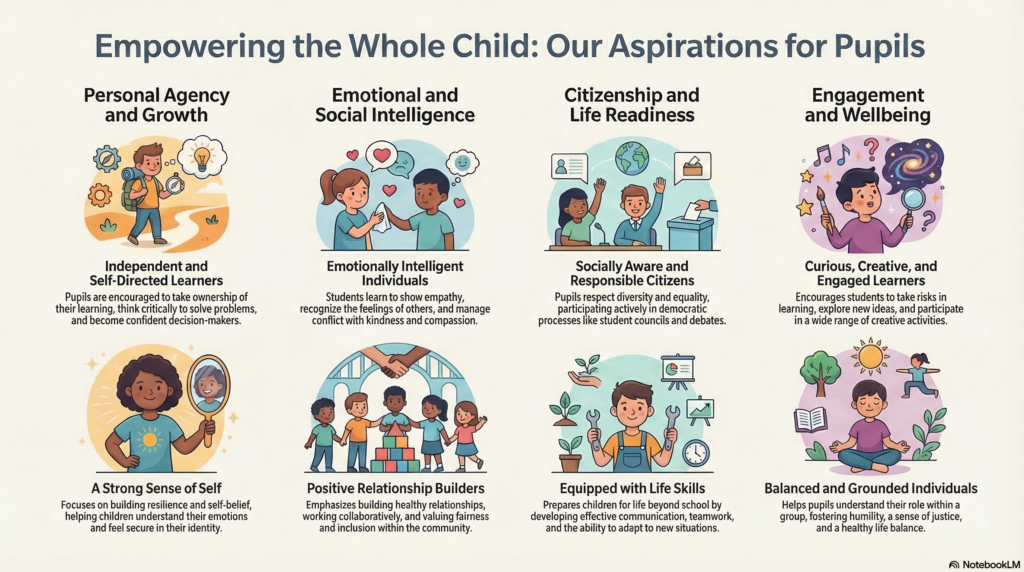
Sample output from Google NotebookLM on Aspirations
The above infographic is an example of what it can produce. You can ask Google NotebookLM to choose a colour scheme, a type of layout, and so on to make it look whatever way you want.
Step 4: Finally, Use It!
Now you’ve got something you can actually work with, share the documents and infographics with your staff. If nothing else it is a lovely visual way of pulling together all of your staff’s thoughts on the foundation stones that your school is built upon.
And crucially: It’s based on what your staff actually said, not what you think they should have said.
Conclusion
We spend a lot of time in schools writing policies from scratch, guessing at “vision statements” and sometimes trying to write something that will sound good to inspectors. However, what everyone already thinks is already done in a simple but powerful activity. The AI just lets you, capture it, organise it and repurpose it.
For me, it moves the activity from a nice discussion to something that could shape your approach to school planning and culture.
What You Need
All you need is:
- Your posters
- A phone camera
- ChatGPT
- NotebookLM
And if you do try it, I’d be really interested to see what comes out of it.
You are a genius! I’ve just followed your steps and I’m delighted with the results! I used ChatGPT to create the infographics also!! One staff member missed the curriculum day and now I have an excellent summary etc for her! I love the use of AI to help us in schools, especially for something very practical like this!!
Thank you, Brian! Glad it was of help to you 🙂